


Apartment List: Rent app
4.414.97K Reviews
App Specs
- Version
- 3.24.0
- Updated On
- License
- Free
- Downloads
- 5,000,000+
- Developer
- Apartment List
- Categories
- House & Home
- Platform
- Android, iOS
Screenshots
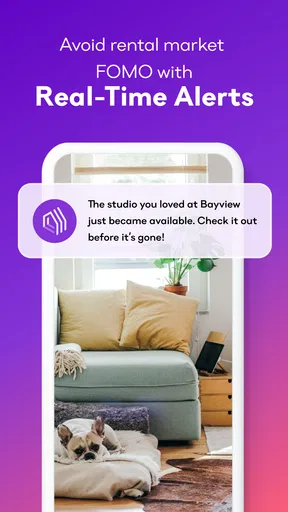


 Analysis by AppCompare
Apartment hunting often becomes a shared household project before anyone has even booked a viewing. I found Apartment List: Rent most useful as a place to explore possibilities and compare what matters, rather than as a substitute for conversations between the people who will actually live there. That distinction makes a difference: a promising listing can look very different once everyone weighs the commute, monthly budget, room needs, and day-to-day routines.
Making a shared search less chaotic
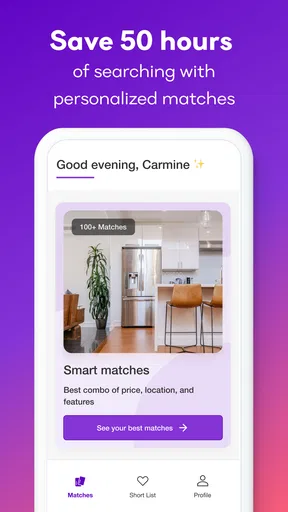
Imagine two people looking for a home after work. One cares most about getting to transit easily; the other is focused on staying within a firm budget and having enough room to work from home. Instead of trading a stream of unrelated listings, they can use the app’s preference-based browsing to make the search more focused. I’d treat the match score as a useful sorting signal, then discuss the actual listing together rather than assuming a high score settles the decision.
That approach is especially helpful when the household is still defining its priorities. Before browsing, each person can name a few non-negotiables and a few preferences they could compromise on. A quiet street might be essential for one person, while a particular amenity is merely a bonus for another. Putting those differences into words early can stop the search from turning into repeated arguments over listings that were never a realistic fit.
Agree on the search before sharing a device
Apartment searches can involve personal details, so I’d decide who is using the device and account before several household members start tapping through the same session. One person’s location, budget, or amenity choices may not represent everyone’s needs. If you do share a phone or tablet, make a habit of checking the search criteria before judging the results; an earlier user’s preferences can shape what the next person sees.
I’d also keep a separate note of the household’s agreed requirements instead of relying on anyone’s memory of what they selected. A short list of maximum affordable rent, acceptable areas, and must-have features gives everyone a stable reference point. It is a simple workaround, not a special household tool, but it helps distinguish a genuine change of mind from a search that has quietly drifted.
Turn browsing into a decision routine
The swipe format makes quick browsing easy, but speed is not the same as progress. I’d use a short session to flag possibilities, then return to the most promising listings when there is time to inspect the details and compare them calmly. For a couple or group, each person can explain why a place caught their attention: perhaps the location works, the amenities fit, or the layout seems more practical. That conversation is more useful than treating a swipe as a final yes.
A practical routine is to compare a small set of candidates against the same questions: does the location work for everyone, does the budget still make sense once utilities are considered, and are the listed amenities actually relevant? The app can help surface options, but the household still has to decide which trade-offs are acceptable. I would avoid letting an appealing photo or a strong match score outweigh a detail that could affect daily life.
Worth Reading Before You Choose

EA SPORTS FC Mobile 26 Is a Bigger Football Game, but It Takes Time

Flipboard Shows What News Apps Must Do Beyond the Feed

Switching to Android Auto Means Rethinking Your Driving Routine

Google Calendar Makes a Crowded Week Easier to Manage

Ludo King Makes the Most of the Minutes Between Plans

Baby Panda World Brings Quick Play to Modern Phones, but Its Game Library Feels Busy
Getting Started with Apartment List
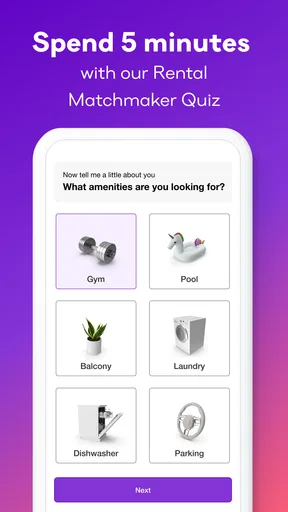
So, you download the Apartment List: Rent app, and right off the bat, it's super user-friendly. The app starts off by asking a few basic questions to tailor the listings to your specific needs. You input details like your desired location, budget, and must-have amenities. The interface is clean, and honestly, it feels like the app genuinely wants to help you find the perfect place.
Features That Stand Out
One of the coolest features is the personalized match scores. After inputting your preferences, the app gives each listing a match score. This nifty little feature quickly helps you sift through what might work for you and what won’t.
For a shared search, I’d use that score to start a discussion rather than end one. If a listing seems like a strong fit to one person but not another, compare the preferences that may be driving the result and decide whether they still reflect the household’s priorities. It’s a handy way to notice patterns, but it cannot make a group decision on your behalf.
Plus, the app offers a swipe feature, almost like a dating app. You swipe right if you're interested and left if you’re not. It makes the whole process feel less like a chore and more like a fun activity. I found myself swiping on my commute, during lunch breaks, and even while binging Netflix! It’s addictive in the best way possible.
In the Details
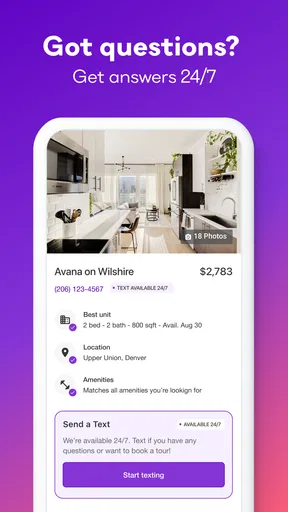
I also appreciate the detailed listings. Each apartment has comprehensive information, including high-quality photos, floor plans, and a rundown of amenities. You can even see if utilities are included, which is a huge time-saver when you’re budgeting.
That utility detail is worth checking before a household gets attached to a rent figure. A listing’s advertised price is only one part of the monthly picture, and whether utilities are included can change how two apparently similar choices compare. I’d make a note of what is stated in each listing and confirm the important cost details directly before making plans around a specific home.
Another handy feature is the map view. It shows you all the available apartments in your desired area, complete with nearby amenities like grocery stores, public transport, and even coffee shops. It's perfect for those of us who need our caffeine fix within walking distance.
For households with different routines, the map is more useful as a way to test a location than as a promise that a commute will suit everyone. Look at the area around a candidate and consider the errands and journeys each person makes regularly. A nearby grocery store may be valuable to one household member, while transit access matters more to another. I’d use the map to narrow the search, then check the route and neighborhood in person where possible.
Good for discovery, not the whole rental process
Compared with jumping between general listing sites, local property pages, and messages shared in a group chat, Apartment List gives the search a more guided starting point: preferences, match scores, swiping, listing details, and a map are brought into one browsing experience. That can reduce the time spent reopening the same options across different places. Still, it is best thought of as a discovery and comparison tool. A household should verify availability, costs, and practical details with the relevant contact before making a decision.
The app is a stronger fit for renters who want help narrowing a broad search and who are comfortable making choices from a stream of listings. It is less suitable for someone who already has a specific building or landlord in mind and only needs direct information from that source. It may also frustrate renters whose search depends on a very particular requirement if the available choices do not line up; a focused local search or direct contact can then be more efficient than continuing to browse.
Age, trust, and realistic expectations
Apartment List is a House & Home app from Apartment List, and it is free to use. It has an Everyone content rating, but that is not a sign that it is designed for children to manage a rental search. I’d keep decisions and any contact with landlords in the hands of the adults who will be responsible for the lease. Younger household members can share opinions about a room or neighborhood, but adults should review the listing and handle the practical steps.
It has a 4.5 average from around 66,000 ratings, and more than five million installs. Those figures suggest that many renters have tried it, but they do not guarantee that a particular listing will suit your household or remain available. I’d treat the app as one source for finding options, not as an endorsement of every property shown. The sensible next step is to verify the details that matter to you before spending time or money on a viewing or application.
The app’s current version is 3.20.0, and it runs on OS 9 or later. It was released on January 30, 2017, so it is an established rental-search app rather than a brand-new experiment. If you are choosing between this and a general search engine, the practical difference is the guided apartment-focused browsing; if you need authoritative answers about a property, direct communication with its contact remains essential.
Why I’d Recommend It
What really sets this app apart is its ability to refine searches based on your feedback. The more you use it, the better it understands your preferences. It’s like the app is learning what you love and what you can live without. Plus, having the option to contact landlords directly through the app is a huge plus. It keeps everything streamlined and organized.
For a household, that streamlined contact option is useful when someone is ready to ask about a specific place, but I’d still agree on who will send the message and what needs to be clarified. One person can gather questions from everyone first, such as whether a listed feature is available or whether the advertised details still apply. Keeping the conversation purposeful helps avoid duplicate enquiries and makes it easier to compare answers later.
My main caution is not to confuse convenience with certainty. A match score, a polished set of photos, and a promising map location can make a listing feel more complete than it is. I’d use the app to create a shortlist, check the details that affect your budget and routines, and then confirm them directly. If your household needs a very narrow set of conditions, broaden or adjust the search thoughtfully rather than assuming the first results represent every possible option.
Overall, if you’re in the market for a new place and want to save yourself some time and stress, I’d definitely give Apartment List: Rent a try. It’s intuitive, thorough, and honestly, a bit of a game-changer in the apartment hunting world. Happy house hunting!
Pros
- User-friendly interface with intuitive navigation.
- Extensive database of rental listings.
- Customizable filters for precise searches.
- Detailed property descriptions and photos.
- Free to download and use.
Cons
- Some areas have limited listings.
- Occasional app crashes reported.
- In-app ads can be distracting.
- No direct contact with landlords.
- Requires account to save searches.
FAQs for Apartment List: Rent app
What features does Apartment List: Rent offer to help find the perfect apartment?
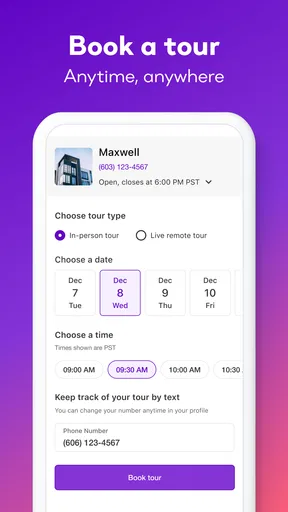
Apartment List: Rent provides a tailored experience by using a personalized quiz to match users with apartments that fit their preferences. It offers detailed listings, virtual tours, and neighborhood insights. Additionally, users can save favorite listings, track their applications, and receive updates on new listings and price drops.
Is Apartment List: Rent free to use, and are there any hidden charges?
Yes, Apartment List: Rent is free to download and use. It does not charge users for browsing or applying to apartments. However, it’s important to be aware that landlords or property managers may have application fees or deposit requirements, which are separate from the app’s services.
How accurate are the listings on Apartment List: Rent, and how often are they updated?
Listings on Apartment List: Rent are frequently updated to ensure accuracy and availability. The app partners with numerous property managers and landlords to provide real-time data. Users are advised to act quickly on listings they like, as availability can change rapidly in competitive markets.
Can I use Apartment List: Rent to find apartments in multiple cities?
Absolutely. Apartment List: Rent allows users to search for apartments in various cities across the United States. The app makes it easy to switch between locations, and users can compare listings in different cities to find the best fit for their needs, whether relocating or considering multiple options.
How does Apartment List: Rent ensure the safety and security of its users?
Apartment List: Rent prioritizes user safety by verifying listings and partnering with reputable landlords and property managers. The app encourages users to report suspicious listings and provides tips on recognizing potential scams. It also ensures that personal data is protected according to industry standards.


